

Network Protocol Testing
Comprehensive Testing
Confident Deployment
Uncover bugs, performance and operational issues before deployment.
We deliver industry-proven testing solutions and tools for network protocols, covering SNMP, MQTT, TCP/IP, and NETCONF implementations.
The well-established IWL SilverCreek SNMP Test Suites, Maxwell Pro TCP/IP Tests, and IWL MQTT Tests—originally developed by InterWorking Labs (IWL)—continue their legacy of excellence under Seguesoft.
Automated Network Protocol Testing
Our fully automated tests and tools are designed to identify and address potential issues before they impact performance, enabling network device vendors to validate their implementations and deploy with confidence.
Network devices incorporate network protocols. Network protocols are rules the devices must follow to ensure the data flows correctly among all the devices. Software developers read the rules and then write code to implement the rules for their devices. That’s how devices communicate on the Internet.
However, those network protocols/rules are very difficult to implement correctly. Sometimes the rules are vague or ambiguous, often something is missed. As a result, the protocols are mis-implemented on the device, creating interoperability problems, application failures, and/or security vulnerabilities.
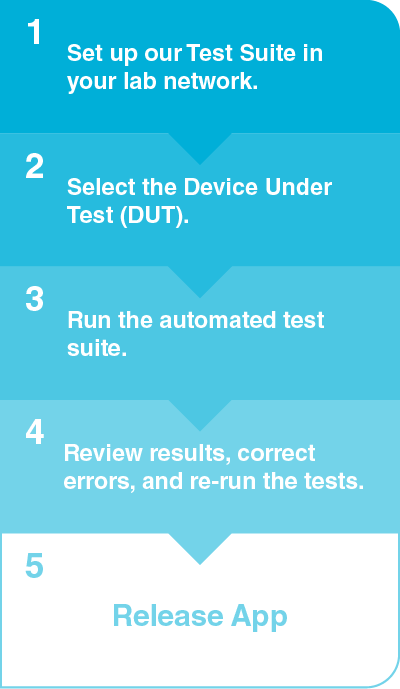
We offer automated network protocol test suites that automatically detect errors in the device. The errors are collected into a report with each error correlated with the corresponding rule. With this report, the software developer can correct the errors and execute the test suite to ensure proper operation of his device.
SegueSoft specializes in protocol testing, offering a suite of tools designed to ensure the reliability, security, and compliance of key network protocols. We provide automated tests and tools for testing:
- IWL SilverCreek Test Suite: Testing SNMP agents
- IWL Maxwell Pro: Testing TCP/IP implementations
- IWL MQTT Tests: Testing MQTT servers
- NETCONF Browser tool (NETCONFc)
These protocol testing tools are crucial for verifying that network protocols are implemented accurately according to specifications, helping identify any vulnerabilities, security and performance issues. This precision in protocol conformance ensures that products meet stringent industry standards.

Automated Network Protocol Testing
Elevate Device Performance
Understanding Various Protocol Testing Types
Stress Testing:
Stress testing evaluates protocol performance under heavy load or adverse network conditions, helping identify potential bottlenecks and ensuring protocols can handle high-demand scenarios.
Compliance Testing:
Compliance testing ensures adherence to industry regulations, guidelines, and best practices, promoting compliance with established standards and protocols.
Regression Testing:
Regression testing validates protocol functionality after updates or changes to ensure no unintended side effects, maintaining the integrity of protocol implementations.
Conformance Testing:
Conformance testing ensures compliance with protocol standards and specifications, guaranteeing that protocol implementations meet the required standards
Performance Testing:
Performance testing measures protocol performance metrics such as throughput, latency, and packet loss to ensure optimal performance under different network conditions.
Interoperability Testing:
Interoperability testing verifies compatibility and seamless interaction between different implementations of the same protocol, ensuring smooth communication between different devices and systems
Security Testing:
Security testing assesses vulnerabilities, authentication mechanisms, and encryption protocols to ensure robust network security and protect against potential threats.
Load Testing:
Load testing measures the performance and scalability of protocols under high user and data loads, ensuring they can handle the expected volume of traffic without degradation.
Why do I need an automated network protocol test suite?
Manual testing consumes budget and resources to reveal only the obvious errors.
- Code reviews, due to the specialized nature of network protocols, do not easily reveal the mis-implementations.
- Diagnosing and mitigating these problems after deployment is costly.
- Post-deployment bugs reported by your customers and users are ten to 30 times the cost to repair compared to finding and fixing bugs prior to initial release. (Source: Capers Jones, NIST)
How our automated network protocol test suite fits in
InterWorking Labs (IWL) products — including the SilverCreek SNMP Test Suites, Maxwell Pro TCP/IP Tests, and IWL MQTT Tests — trusted by leading organizations and thousands of network professionals, now continue their legacy under Seguesoft.


SegueSoft Inc. (SSI) has acquired all rights to SilverCreek, Maxwell Pro TCP/IP Tests, and the IWL MQTT Tests from InterWorking Labs, Inc. (IWL).
This document references content originally developed by IWL, now authorized for SSI’s use under the acquisition agreement.